Resetting a phone may solve storage, performance, or software problems, but it can also trigger an ownership check during setup. That is especially disruptive overseas, where the phone may be needed for a local SIM, banking verification, navigation, and work apps. A safe recovery plan separates account verification from app restoration.
Do Not Confuse Recovery with a Bypass
A request for the previous account is a security feature, not a normal app-installation error. The phrase bypass google account huawei is commonly used in search results, but disabling or evading that protection can create legal, privacy, and device-security risks.
Avoid FRP-removal packages, modified firmware, “unlock boxes,” remote-control sessions, and videos that ask you to exploit accessibility or emergency features. Even when a method appears to work, it may expose personal data, block updates, or leave the phone unstable.
Identify Which Account the Phone Requires
Read the setup screen carefully. A Google account prompt should be handled through Google’s official recovery process. A HUAWEI ID or Activation Lock prompt should be handled through Huawei’s password reset or account-change appeal. Do not assume a new Google account will replace the account previously associated with the phone.
Use the recovery email, phone number, trusted device, or other verification methods attached to the original account. If the phone was bought used, contact the seller and request that the device be removed from the seller’s account. Keep messages, receipts, and the device serial number as ownership evidence.
Official recovery path: identify the account, verify ownership, and use authorised support.
Escalate Through Official Huawei Support
When self-service recovery is not possible, use Huawei’s official support channels or an authorised service centre. Bring the phone, purchase documentation, IMEI or serial number, and identification. Support availability and required documents may vary by country, so check the local Huawei service-centre page before travelling.
Do not repeatedly reset the phone or install random recovery files. Repeated changes can make diagnosis harder and may erase information that helps confirm ownership.
Rebuild the Phone for Overseas Use
After the ownership check is resolved, update the system and sign in to the accounts you actually use. Install local apps from AppGallery first. For banking, government, payment, or identity apps, use only the official store listing or the provider’s verified website.
The page attached to bypass google account huawei is about downloading Google apps on a Huawei phone. It can be used during post-reset app restoration, but it does not provide a legitimate account-lock bypass. Check compatibility, notifications, location access, and background activity for each important overseas app.
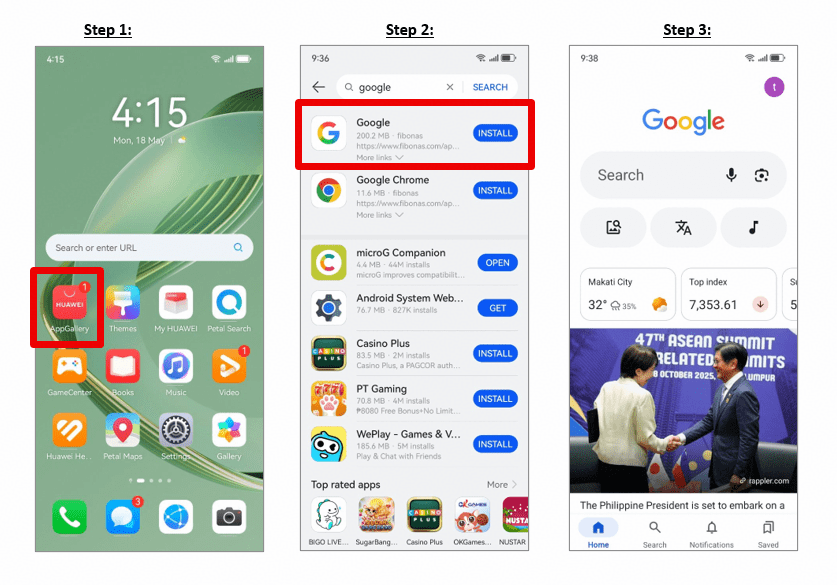
Post-recovery app setup based on the supplied Huawei Community Google-app page.
Prepare Before the Next Factory Reset
Back up photos and documents, confirm that recovery numbers still work, and record which Google or Huawei account is signed in. Before selling or transferring the device, remove accounts from system settings and complete the reset while the phone is still under your control.
Treat bypass google account huawei as a search intent that needs a safe answer: recover the original account, prove ownership, and then restore apps through trusted channels. That approach preserves security and gives the device the best chance of remaining stable and supported.